Private beta · For heavy-civil general contractorsPrivate beta · Heavy-civil GCs

Level the quotes. Find the hole.
Award it in writing.

Bid Reasoner lines up sub bids against your scope, flags unpriced items, and builds the award paperwork once you decide.

Concrete Deck · Decision Workbench Sample data · illustrative output, not a live AI run
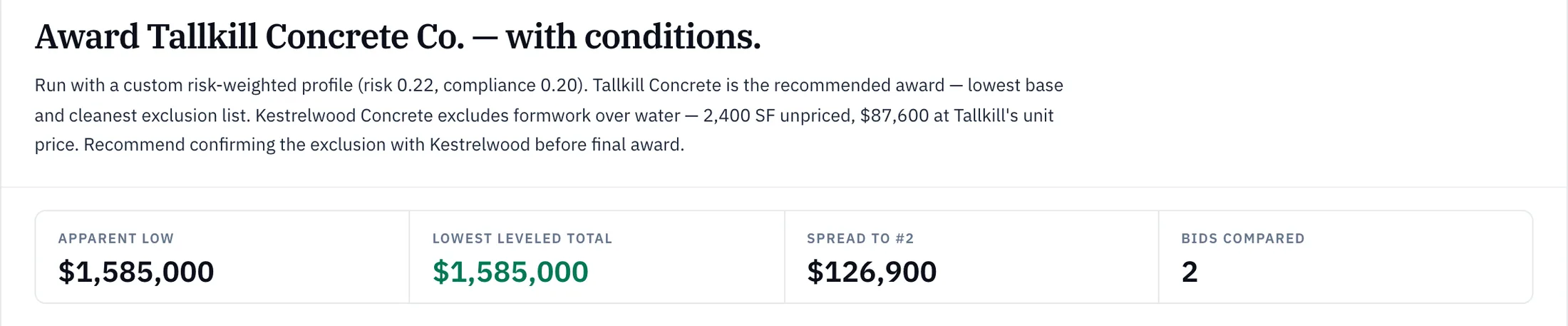
Sample data: Decision Brief for a fictional bridge-deck concrete package, recommending Tallkill Concrete Co. with conditions: apparent low $1,585,000, lowest leveled total $1,585,000, spread to number two $126,900.

Sample data · illustrative output, not a live AI run.

On paper the spread is $39,300; leveled, $126,900.

How it works

Follow one bridge-deck package from first quote to locked award.

Sample data: fictional bidders and project. Screens captured from Bid Reasoner, October 2026.

Concrete Deck · Line-item matrix Sample data

01 · LEVELED TO YOUR SCOPE

Nine pay items. Your quantities. Both bids on one grid.

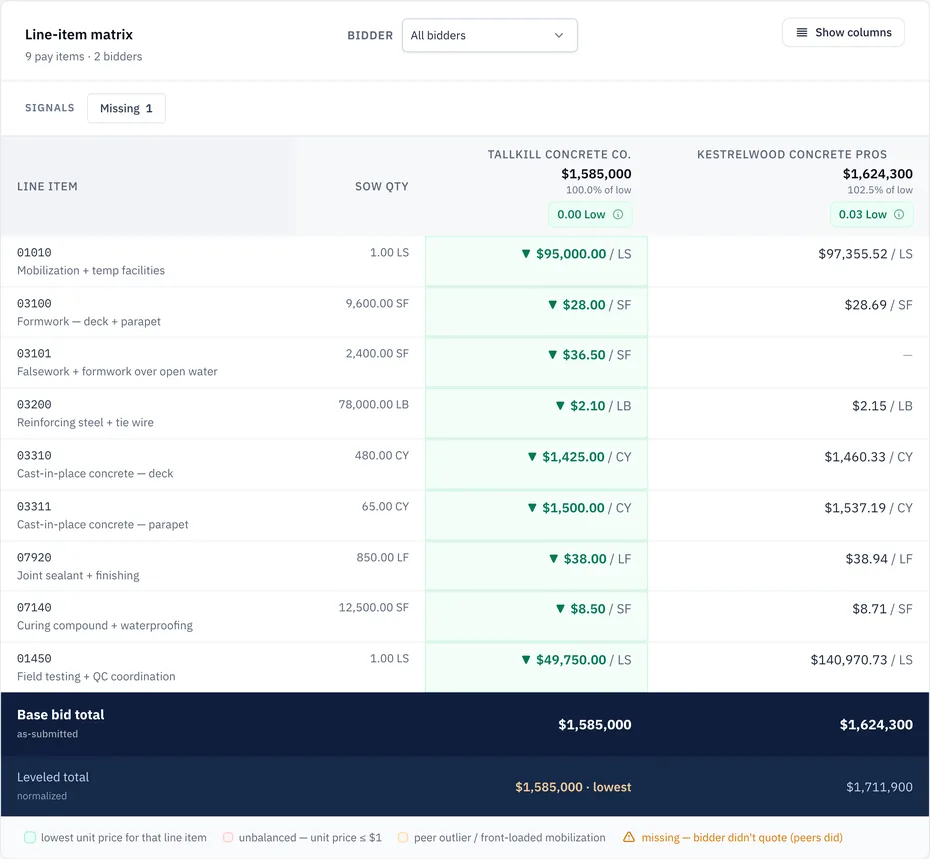
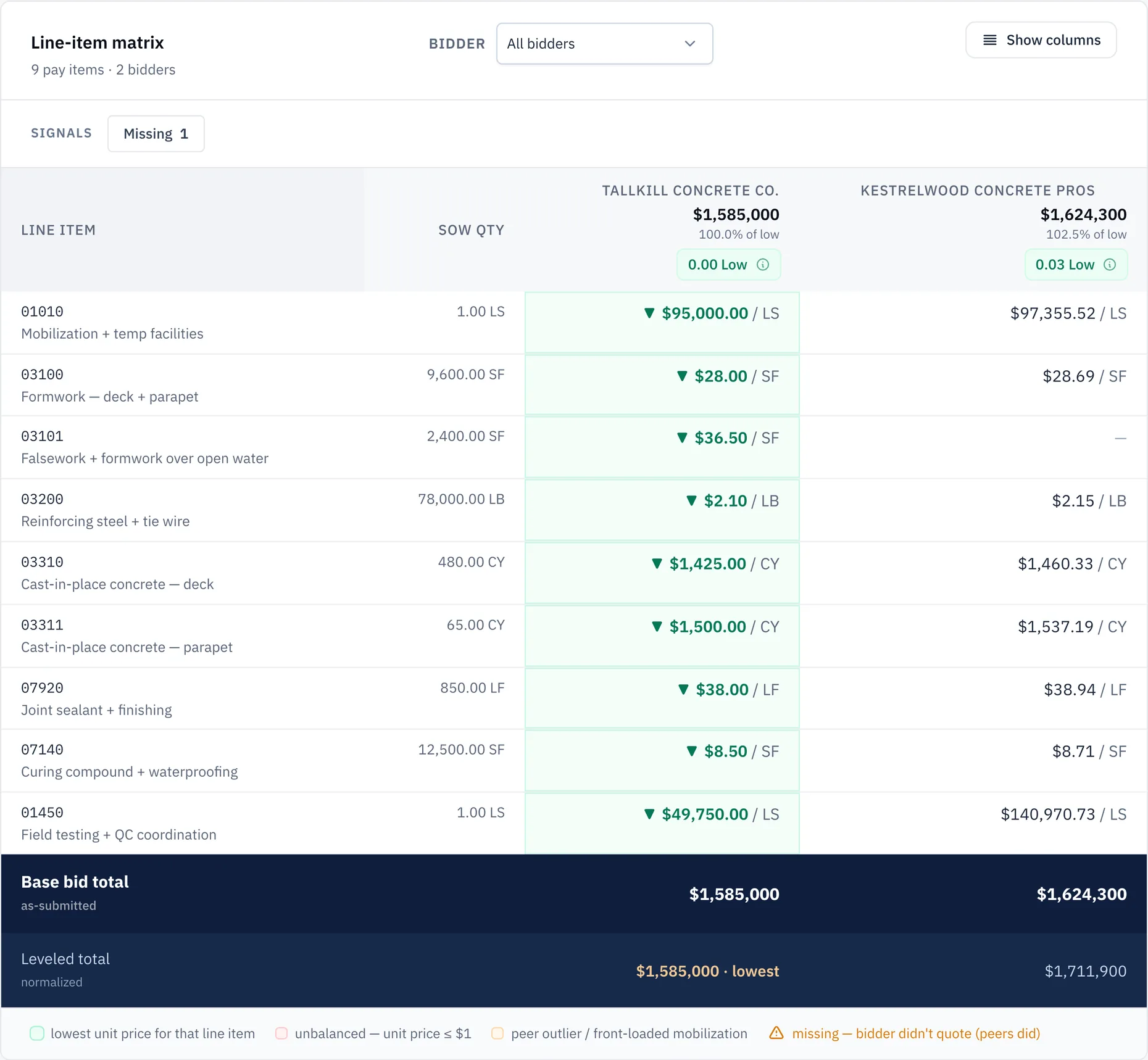
Line items are pulled off each sub’s bid form and lined up against your scope quantities. On paper, Tallkill is $39,300 low.

Sample data: line-item matrix comparing two concrete bids across nine pay items with scope quantities, lowest unit prices marked, one item not priced by one bidder, and as-submitted and leveled totals in the footer.
Sample data
Excerpt from the line-item matrix · sample data
Line itemSOW qtyTallkill Concrete Co.TallkillKestrelwood Concrete ProsKestrelwood
03100Formwork — deck + parapet9,600 SF9,600 SF$28.00 / SF(lowest)$28.69 / SF
03101Falsework + formwork over open water2,400 SF2,400 SF$36.50 / SF(lowest)— not priced
03200Reinforcing steel + tie wire78,000 LB78,000 LB$2.10 / LB(lowest)$2.15 / LB
Base bid total (as-submitted)As submitted$1,585,000$1,624,300
Leveled totalLeveled$1,585,000lowest$1,711,900
  1. As-submitted and leveled totals
  2. Kestrelwood: not priced
  3. Leveled total, with the plug: $1,711,900

02 · THE HOLE

The spread on the screen isn’t the real spread.

Kestrelwood left 2,400 SF of falsework over open water unpriced. A fixed rule lists it as missing, and a labeled plug at the other bidders’ median, $36.50/SF, adds $87,600. The leveled spread is $126,900.

Sample data: an adjustment row labeled auto-level, unbid scope of work, adding 87,600 dollars to one bidder's leveled total, with its basis and a remove button.
Close-up · the adjustment row · sample data
  1. Labeled plug you can change or remove

03 · YOUR CALL

The software recommends. You award.

Agree, and the award page shows “Aligns with AI”. Go the other way, and it marks the decision as an override and asks for a category and a reason. Both print in the award memo.

Sample data · illustrative output, not a live AI run

Sample data: award page showing the Bid Reasoner recommendation, Tallkill Concrete Co. at 78 percent confidence, marked aligns with AI, with a note that the user makes the final call.
  1. Recommendation and alignment

04 · PAPER OUT

Award letter, LOI, draft subcontract. Generated and locked.

The award page builds 15 Word documents, 3 Excel reports and a combined PDF packet, downloadable as one .zip. Lock the final set, and later downloads serve frozen copies of the Word documents and the PDF packet.

Sample data: award page lock line stating the final documents are locked and downloads serve the frozen copies, with a published snapshot ID.
Sample data
  1. Frozen at lock

That was a sample package. Bring one of yours.

Level one of your packages →

Built for the people who carry the award

When the owner asks why, the answer is already in the file.

Not in one estimator’s memory, a reply-all thread or a tab called FINAL_v3.

Rules you can check by hand.

The pricing checks aren’t AI. Same extracted line items, same flags, every time.

  1. If a unit price is at or below $1.00

    then flagged as unbalanced

  2. If a unit price is 2× or more, or half or less, of the median for that pay item (3+ bids)

    then flagged as a peer outlier

  3. If a bid total is 20% or more off the median total (3+ bids)

    then flagged

  4. If mobilization is 10% or more of the bid total

    then flagged as front-loaded; high at 15% or more

  5. If a pay item in your scope of work isn’t in the bid (matched by pay-item code)

    then listed as missing for that bidder

Rule flags point to the pay item or bid total. AI findings point to the page.

Saved AI findings cite the page.

Findings that can’t be traced are withheld, and the run records how many.

Sample data · illustrative output

Sample data: an AI finding that one bidder excludes formwork over open water, with a source snippet, the bidder's file name and page 1, and approve and reject buttons.
  1. Source file and page

Your numbers

  • Each company’s projects, bids and awards are kept in its own workspace.
  • Bidders never see another bidder’s bid files.
  • Bid Reasoner doesn’t train or fine-tune any model on your bids.

Questions a chief estimator asks first

Does Bid Reasoner pick the winner for us?

No. Analyze Package recommends a bidder and shows its reasoning, including why it did or did not go with the low bid. Your team makes the award. If you pick a different bidder, the award page marks it as an override and asks for a category and a reason, and both are printed in the award memo.

How do I know a finding isn’t made up?

Every AI finding that is saved names the bidder, the source document and the page. Price and scope findings must also tie to an extracted line item. Findings that cannot be traced are withheld, the run records how many were withheld, and its confidence is capped. You can accept or reject each finding.

Who can see our numbers?

Each company’s projects, bids and awards live in their own workspace, and automated tests try every page with another company’s IDs. Bidders see the invitations sent to them, the package files in the folders bidders can see, and their own submissions and threads. They never see another bidder’s bid files or that bidder’s private clarification threads. Everyone on your team can turn on authenticator-app two-factor sign-in, with backup codes.

Do our subs need to create an account?

No password. Each sub gets an emailed invitation link that is good for 30 days. On the first visit they confirm their name. After that, they request a one-time sign-in link by email. Submitting takes four steps: upload the proposal, fill in the required fields (base bid is required), review a pre-submit check, and confirm.

What file formats can subs send?

PDF, Excel (.xlsx and .xls), Word (.docx), CSV, ZIP, and PNG, JPG, WEBP or GIF images. Files can be up to 25 MB, images up to 4 MB. Scanned image-only PDFs may not be read, and very long text PDFs (over about 60,000 characters) are only partly read. For those, ask the sub for the native spreadsheet or a text PDF.

Do we need state DOT pricing data, and does it work outside our home state?

No, and yes. Leveling compares bidders with each other and with your scope, so it works in any U.S. state without government data.

Private beta · Founding partners

Bring a live package. We’ll level it with you.

Send your work email. We set up your workspace, and you keep the bid tab and the award paperwork.

Private beta · founder-direct onboarding · no credit card to apply
Thanks — you’re on the list.

Prefer a call? Book a demo →

Line-item matrix · sample data · swipe to see all columns
Sample data: the full line-item matrix, nine pay items for both bidders with as-submitted and leveled totals.